AIVA Alternative
Name a motif, the instruments and the atmosphere. MusicAI writes an orchestral cue you can play right away.
Make an Orchestral CueAIVA alternative examples of motif driven orchestral cues
Glass Theme and Ember Motif are MusicAI orchestral cues, and each one starts from a short motif description in the Prompt.
-
Orchestral cueGlass Theme 
A clear string and piano motif with a hopeful thematic arc.
motif: clear rising line
instruments: strings, soft piano
atmosphere: hopeful glass light
-
Dramatic cueEmber Motif 
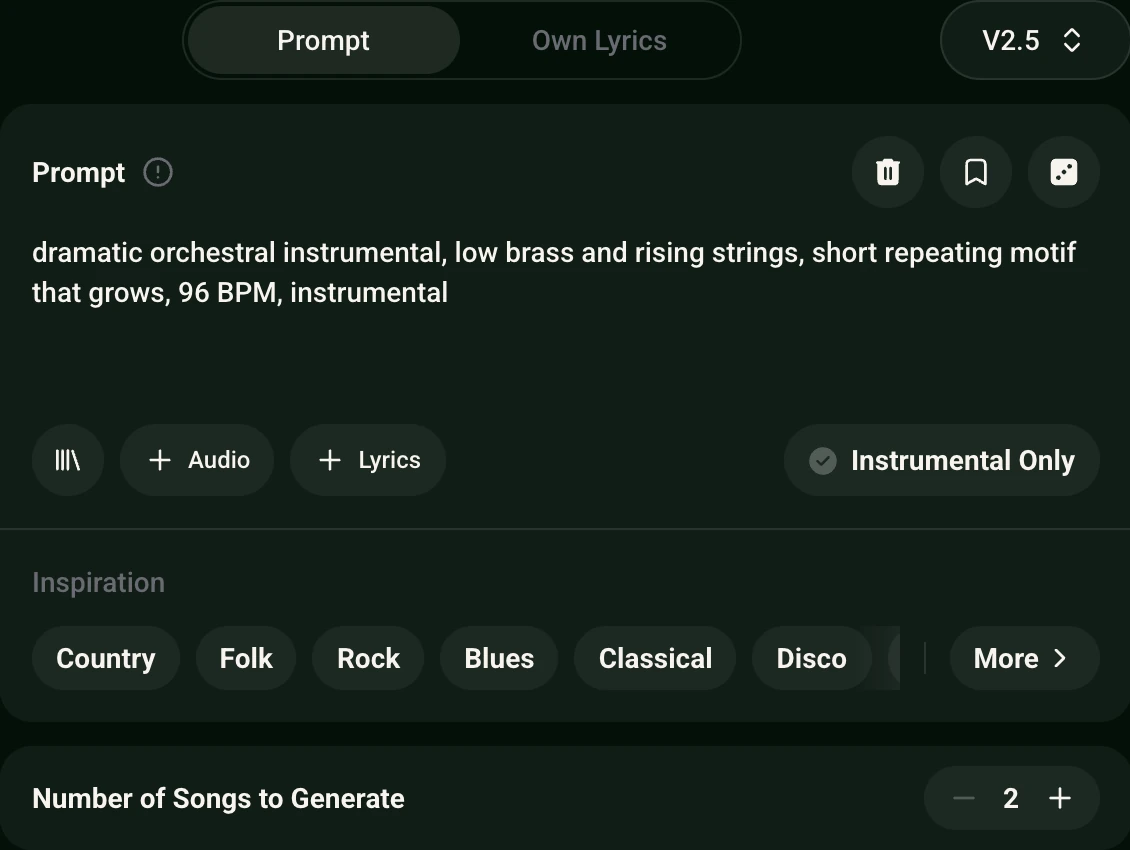
A short repeating motif that grows through low brass and rising strings.
motif: repeating ember cell
instruments: low brass, rising strings
atmosphere: dramatic growth
Two cues from the same AIVA alternative workflow, one hopeful theme and one growing dramatic motif.
How to Make an Orchestral Cue with an AIVA Alternative
Name the motif and colour
In AI Music Generator, write a short motif, the instruments and the atmosphere.
Ask for a full ending
Add full ending, outro, fade out so the last bars resolve.
Generate the cue and listen
Press Generate and play the cue, then adjust the atmosphere in the Prompt if you want a new colour.
Four Motif Habits for Cues in an AIVA Alternative
One Prompt, built habit by habit. Each highlight is one habit at work.
A rising four note horn motif, strings, brass, piano and woodwinds, hopeful and warm, full ending, outro, fade out
- Name the motif clearly A rising line, repeating cell or short rhythmic figure belongs in the Prompt.
- Choose orchestral colour Strings, brass, piano and woodwinds set the atmosphere.
- State the atmosphere Hopeful, dramatic, reflective or warm holds the cue on target.
- Ask for a full ending Write full ending, outro, fade out so the last bars resolve.
What MusicAI brings as an AIVA alternative for orchestral cues
Here is how MusicAI covers each need for motif driven orchestral cues.
- Motif driven cuePrompt names the motif, instruments and atmosphere
- Orchestral colourStrings, brass, piano and woodwinds described in the Prompt
- Longer cuesRemix and then Extend in My Workspace carries a cue past its ending
- Full cue endingPrompt for a full ending, outro, fade out
- Chamber or full ensembleDescribe the ensemble size in the Prompt
- Restyle a cue you ownAI Remix Generator restyles an upload or library pick
Build more cues on MusicAI with the AIVA alternative
- Write your cue
- AI Music Generator Prompt a motif and orchestral colour.
- AI Classical Generator More classical colour.
- Cinematic Music Generator Broader cinematic cues.
- Ambient Music Generator Softer ambient beds.
- Piano Music Maker Piano led cues.
- Finish a cue
- AI MIDI Generator MIDI starting points.
- AI Stem Splitter Split stems from a finished cue.
- Music Visualizer Visuals for a finished cue.
Why Composers Switch to This AIVA Alternative
For a motif-driven cue, the theme comes straight from your own description.
Motif first. Write a rising line, a repeating cell or a short rhythmic figure in the Prompt, and the cue grows around it.
Ensemble size in words. Ask for piano and strings alone or a full orchestra with brass and woodwinds.
Longer cues later. Open the cue in My Workspace and choose Remix, then Extend, to add bars, or restyle an existing cue in AI Remix Generator.
Frequently Asked Questions
What is the AIVA alternative on MusicAI?
An AIVA alternative on MusicAI that generates motif-driven orchestral cues from a clear Prompt.
How do I describe a motif?
Name a rising line, repeating cell or short rhythmic figure, then the instruments and atmosphere.
Can the cue stay chamber-sized?
Yes. Describe piano and strings or a small ensemble in the Prompt.
Can I make a cue longer?
Yes. Open the cue in My Workspace, choose Remix and then Extend to add more bars.
Can I restyle a cue I already have?
Yes. AI Remix Generator restyles an upload or library pick.
Make an orchestral cue with the AIVA alternative
Name a motif, the instruments and the atmosphere, then let this AIVA alternative generate the cue. Cues can be used within the terms of the Commercial License.
Make an Orchestral Cue