Cover: Update Lyrics or Style for an Existing Song
Introduction
When you are not fully happy with the vocals, lyrics, or style of a song—but still like the melody—you can use the Cover feature on MusicAI.
It lets you update parts of a track, such as lyrics or musical style, without rebuilding the entire song from scratch.
Choose the song to cover
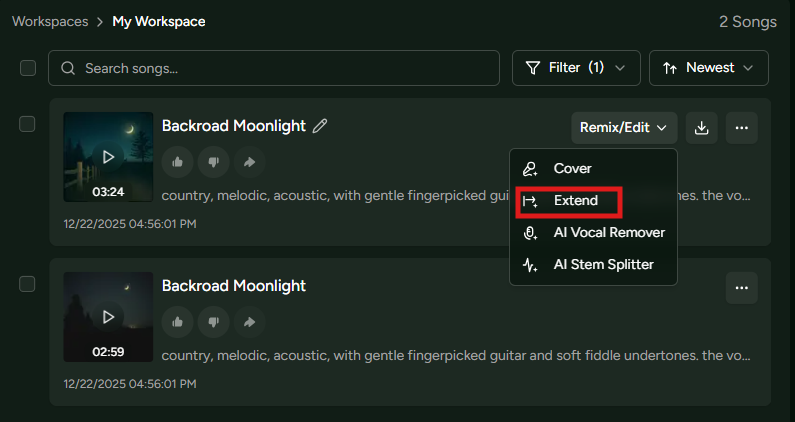
Open the AI Music Generator and, in the workspace panel on the right, select the song you want to modify, then switch to the Cover view.
This is where you configure how the new version of your song will be generated.
Customize your cover
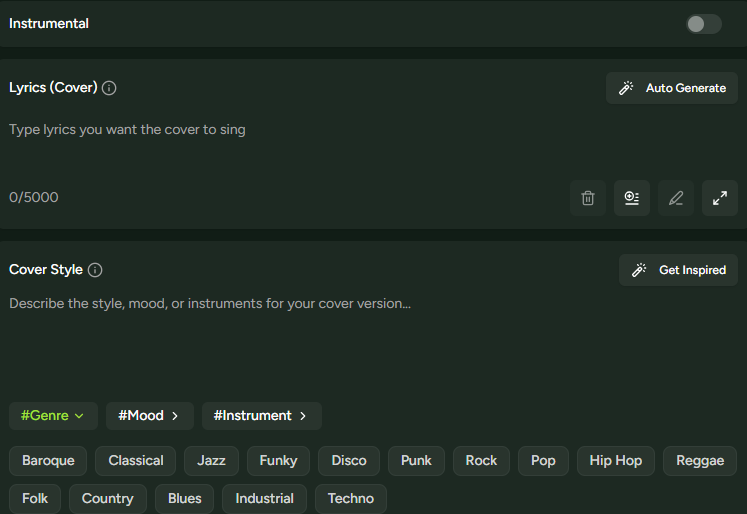
Use the Instrumental option to decide whether the covered version should include vocals or remain instrumental.
In the Lyrics field, enter new lyrics or paste the original lyrics if you want to keep them unchanged.
In the Cover Style field, describe the sound you want. To preserve the original feel, you can simply write “Keep the original style”.
Fine-tune with advanced options
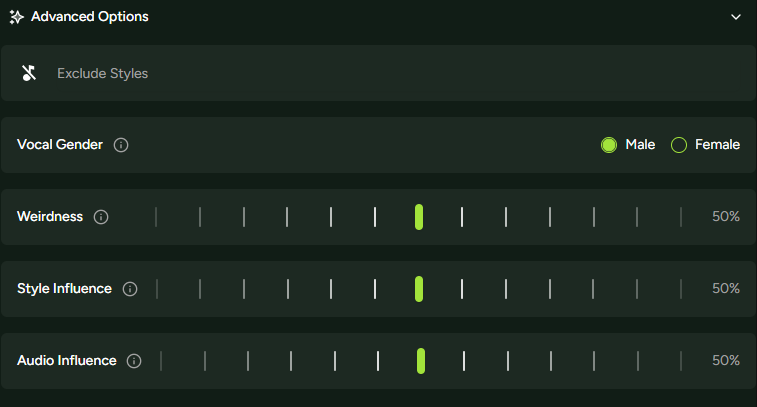
Click Advanced options to access additional controls:
- Exclude Styles: Styles you want to avoid.
- Vocal Gender: Vocal type for the new version.
- Weirdness: Controls how experimental the cover sounds.
- Style Influence: Strength of style guidance.
- Audio Influence: Similarity to the original track.
When you are satisfied, click Generate and wait for the AI to create the updated version of your song.