Best AI Music Maker From First Idea to Finished Track
The best AI music maker covers the whole road, from the first idea to a file ready to publish. MusicAI starts a track from a vibe preset or a prompt, then edits, splits and masters it in the same browser tab. That full road is what makes a best music maker.
Make Music- 1Pick a vibePreset or prompt
- 2Set BPM and keyOn genre pages
- 3GenerateVersions to compare
- 4Edit and splitEditor and stems
- 5Master and sharePolish and video
Tracks From the Best AI Music Maker
Four instrumentals started from vibe presets in the best AI music maker, one for each everyday moment.
- 01
First-dance wedding
warm acoustic, slow tempo, key of G major, fingerpicked guitar, soft cello, intimateSlow Hours (first dance)0:00 / 0:00Refresh the page to load the audio.
- 02
Sunny travel vlog
sunny acoustic pop, mid-tempo, key of D major, claps, ukulele, brightCoastline Run (travel vlog)0:00 / 0:00Refresh the page to load the audio.
- 03
Mindful podcast intro
mindful acoustic, slow tempo, key of C major, felt piano, light guitarQuiet Desk (podcast intro)0:00 / 0:00Refresh the page to load the audio.
- 04
Morning coffee shop
morning coffee shop acoustic, mid-tempo, key of F major, brushed drums, upright bassSteam and Saucers (coffee shop)0:00 / 0:00Refresh the page to load the audio.
Best AI Music Maker Downloads and Formats
Every song from the best AI music maker on MusicAI downloads ready for the next step.
- MP3
- Light files for sharing
- WAV
- Full quality for editing
- FLAC
- Lossless archive copy
- PNG
- Cover art for the track
- License
- Commercial license for use
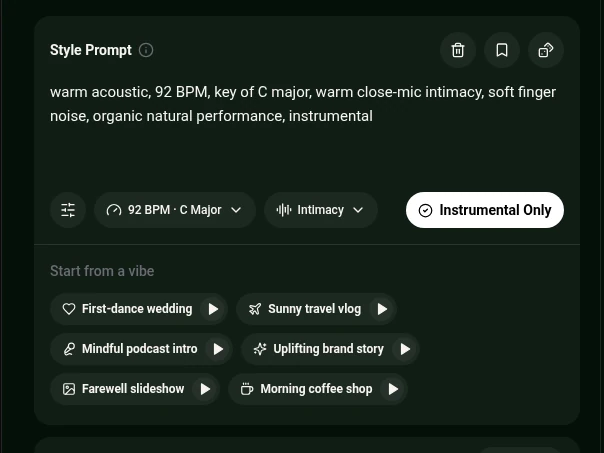
Vibe Presets in the Best AI Music Maker
Genre pages open the maker with ready Style Prompts, a shortcut every best music maker should offer. Acoustic Music Generator, for example, lists presets for these moments.
Open Acoustic Music GeneratorHow to Use the Best AI Music Maker
Choose a starting point
Tap a vibe preset on a genre page or write a prompt in the AI Music Generator.
Start from a vibeSet tempo and key
On a genre page such as Acoustic Music Generator, pick BPM and key from the menu under the Style Prompt.
BPM and keyGenerate and compare
Listen to the versions and choose the stronger one.
GenerateFinish the track
Edit, split stems or master it, then download.
Download

Finishing Tools Beside the Best AI Music Maker
Tools that sit beside the best AI music maker and turn a draft into a release. Together they make MusicAI the best music maker for a finished track.

Frequently Asked Questions
What makes the best AI music maker for everyday projects?
Fast starting points, tempo and key menus on genre pages, and tools to finish the track. MusicAI covers all of them in one browser tab.
What are vibe presets?
Ready Style Prompts on genre pages, such as First-dance wedding or Sunny travel vlog on Acoustic Music Generator. Tap one and adjust it.
Can a finished track be mastered?
Yes. AI Mastering polishes a track toward a target sound or a reference song.
Can the track be split for mixing?
Yes. AI Stem Splitter separates vocals, drums, bass and others.
Which formats do songs download in?
Each song downloads as MP3, WAV or FLAC with a PNG cover and a commercial license.
Make a Track with the Best AI Music Maker
Pick a vibe, generate versions and finish the stronger one in the browser.
Make Music