Best AI Rap Generator That Writes the Lyrics and Makes the Rap Song
This best ai rap generator works in two steps. The first step writes rap lyrics from a topic, a rap style and an emotion. The second step turns those lyrics into rap music, right in the browser on any device with no download.
Open the AI Rap GeneratorMake a rap beat firstRap Songs Made With the Best AI Rap Generator
- Hard trap rap with a heavy 808Neon Bars0:00 / 0:00
Refresh the page to load the audio.
- Same lyrics, second versionNeon Bars, Version B0:00 / 0:00
Refresh the page to load the audio.
- Boom bap rap with warm pianoPaper Trail0:00 / 0:00
Refresh the page to load the audio.
Each Field in the AI Rap Generator and Its Job
The best ai rap generator turns a handful of fields into verses and a finished track, so each field below has a clear job.
| Field | What to enter | What it controls |
|---|---|---|
| Topic | 200 to 1200 characters about the subject and story | What the verses talk about |
| Rap Style | A style such as Conscious Hip Hop | Flow and attitude of the delivery |
| Emotion | A mood such as Confident | The feeling behind each line |
| Language | A language such as English | The language of the lyrics |
| Rhyme Target | Optional words separated by commas, up to 80 characters | Which sounds the verses rhyme toward |
| Title | Optional, up to 80 characters | The song name, generated when the field is empty |
| Pro Settings | Point of view, tempo, rhyme focus, profanity level and more | Finer control over how the rap is written |
Four Steps to a Track in the AI Rap Generator
Open the AI Rap Generator
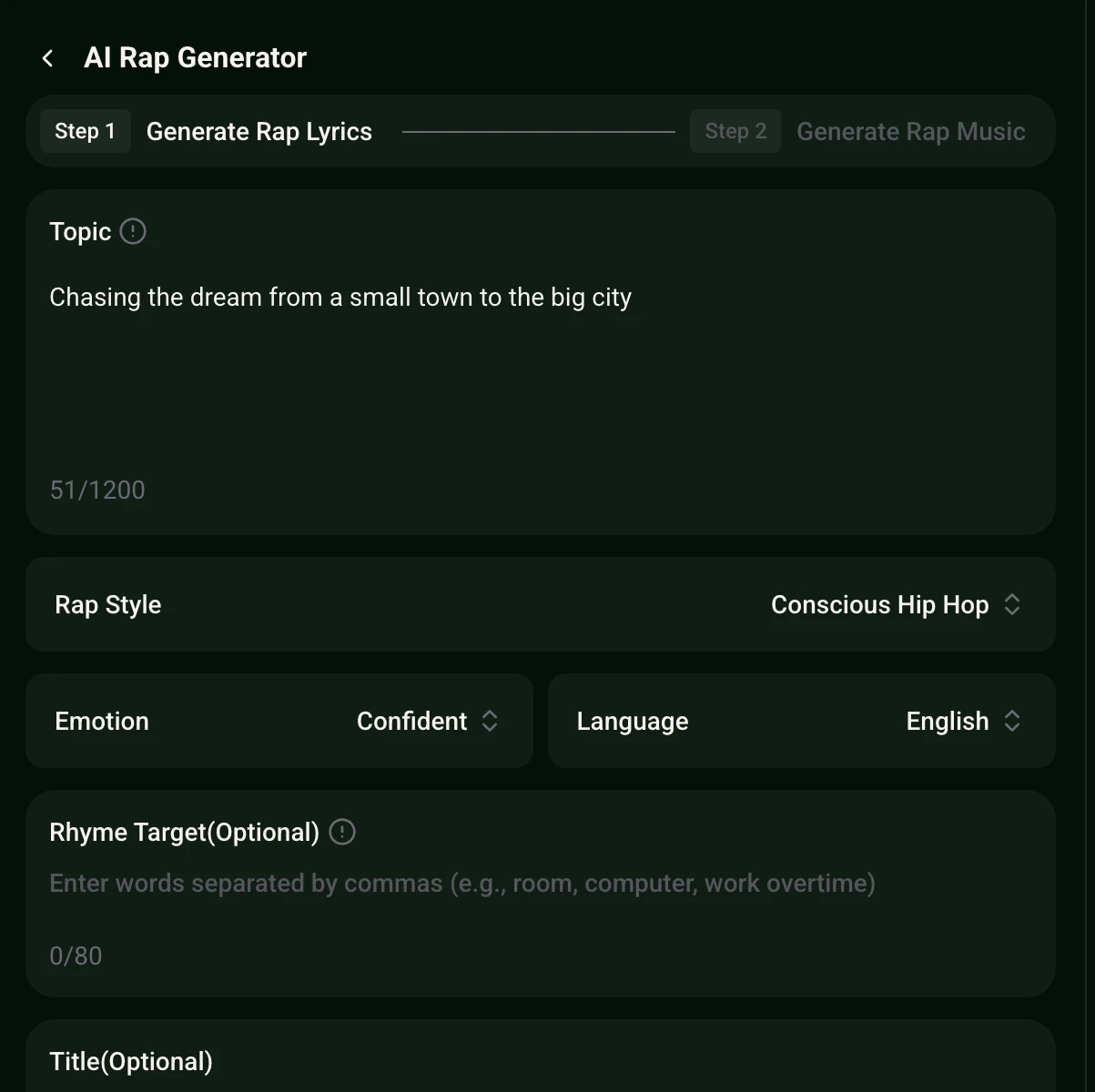
Open the tool in any browser. The panel starts with Step 1, Generate Rap Lyrics.
Describe the topic and pick the voice of the rap
Write 200 to 1200 characters about the subject, then choose Rap Style, Emotion and Language.
Add a rhyme target and open Pro Settings
Type words the verses should rhyme toward, add a title if wanted, and set point of view, tempo or rhyme focus.
Generate the lyrics, then the rap music
Read the verses, then move to Step 2, Generate Rap Music, to hear the finished rap song.
Where the AI Rap Generator Helps Creators and Hosts
A rap that starts from a clear topic suits many jobs, and the same two steps cover all of them.
- Freestyle practice
- Generate verses on a topic, read them over a beat and rewrite the lines that feel stiff.
- Birthday and wedding verses
- Put names, shared stories and inside jokes in the Topic field for a rap that fits the room.
- Video intros and outros
- Match the Emotion to the video and turn a channel pitch into a short rap hook.
- School and study projects
- Turn a history lesson or a science list into rhymes that are easier to remember.
Topic ideas to paste into the best ai rap generator
Each idea below fits the Topic field. Change the names and details, then pick a Rap Style and Emotion.
A rap about leaving a small town to chase a music career, with the first apartment, the late bus rides and the first crowd that sang along.
A confident battle rap about showing up on time, working hard and letting the results do the talking, with sharp punchlines and a steady flow.
A warm rap for a close friend who is graduating, with memories from the dorm, late study nights and the road trip after finals.
Next Steps After the AI Rap Generator Finishes
The rap can go well beyond the lyrics. These tools pick up where the best ai rap generator ends.
Frequently Asked Questions
What does the best ai rap generator do?
It writes rap lyrics from a topic you describe, then turns those lyrics into rap music. The tool works in two steps inside the AI Rap Generator.
Which settings shape the rap?
Topic, Rap Style, Emotion and Language set the direction. Rhyme Target and Title are optional, and Pro Settings cover point of view, tempo, rhyme focus and profanity level.
How long can the topic be?
The Topic field accepts between 200 and 1200 characters. A fuller description of the subject, the mood and the story gives the verses more to work with.
Can the best ai rap generator work on a phone?
Yes. It is a web app that opens in a browser on a phone, tablet or laptop, with no download.
Where can the finished rap go next?
Rap Beat Maker builds beats, AI Music Video Generator pairs a song with images in 16:9 or 9:16, and AI Stem Splitter separates vocals, drums, bass and others.
Write your next rap with the best ai rap generator
Type a topic, pick a rap style and an emotion, then turn the lyrics into a track.
Make a Rap Song