The Best AI Music Tool for Every Step of a Song
The best AI music tool depends on the job, such as writing a song, pulling a vocal out of a mix, or mastering a final file. MusicAI groups these jobs in one web app, so the right tool sits a click away on any device.
Create a SongBest Music AI Example of a Song Split into Stems
A generated song, then the same song split into its parts by Stem Splitter, the best AI music tool on MusicAI for remix work. Play the full mix, then each stem on its own.
Refresh the page to load the audio.
Refresh the page to load the audio.
Refresh the page to load the audio.
Refresh the page to load the audio.
Match the Task to the Best AI Music Tool
Start from the task on the desk. Each row opens the tool built for it.
Turn an idea into a full songAI Music Generator →
Write lyrics for a themeAI Lyrics Generator →
Pull the vocal out of a trackAI Vocal Remover →
Split drums, bass and moreAI Stem Splitter →
Restyle a song in a new genreAI Remix Generator →
Turn a melody into MIDIAudio to MIDI →
Read the key and tempoKey BPM Finder →
Polish the final masterAI Mastering →
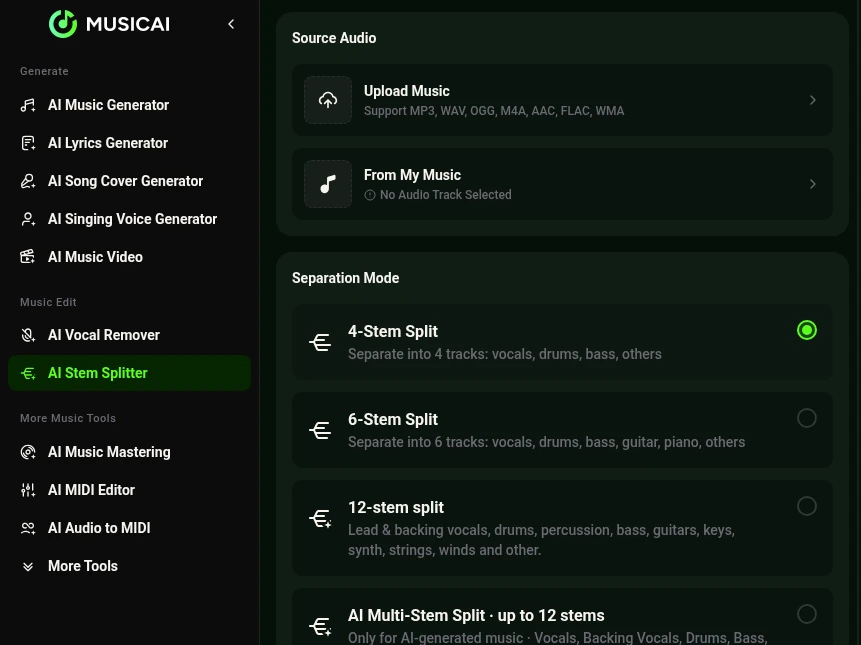
Stem Splitter Modes in the Best AI Music Tool
Among the best AI music tools on MusicAI, Stem Splitter handles the most remix work. Upload a song and pick how far to split it.
Use the Best AI Music Tool in Three Steps
The same short route works whichever best AI music tool the job calls for.
- STEP 1
Pick the job
Choose a tool from the task list, from the generator to mastering.
- STEP 2
Add the input
Type a prompt, paste lyrics or upload an audio file.
- STEP 3
Get the result
Play the output in the browser and download it.
Who Uses the Best AI for Music
Different people reach for a different best AI music tool.
Video creators
Custom background songs with Instrumental Only for voice over.
Singers
Instrumentals from AI Vocal Remover for covers and rehearsal.
Producers
Stems, MIDI notes, key and BPM for sampling and remixing.
Songwriters
Lyrics drafts turned into sung demos.
Frequently Asked Questions
What is the best AI for music beginners?
The AI Music Generator. A short prompt or a set of lyrics becomes full versions, and Instrumental Only switches off the vocal.
Which tool separates vocals and instruments?
Stem Splitter divides a song into 4 or 6 stems, and up to 12 for AI songs. AI Vocal Remover returns a vocal and an instrumental track.
Does MusicAI need a download?
MusicAI is a web app. Every tool opens in a browser on a phone, a tablet or a computer.
Can one account use all the best AI music tools here?
Yes. The generator, the editing tools and the analysis tools sit behind the same login.
Which file formats come out of a generated song?
Tracks come with a commercial license and download as MP3, WAV or FLAC, plus a PNG cover image.
Open the Best AI Music Tool for the Job
Create, split, edit and master songs in one web app, with the best AI music tool for each step.