Night Shift (Version A)
Refresh the page to load the audio.
Night Shift (Version B)
Refresh the page to load the audio.
Best Beat Making Software for Fast AI Beats Online
The best beat making software turns a beat idea into sound before the idea fades. On MusicAI, a line of text and a genre chip become instrumental versions, like the techno pair in the tempo deck. It runs in the browser on any device.
Make a BeatTry the AI Beat GeneratorBest Beat Making Software Controls
The best software for making beats puts the important choices up front. These four shape each beat on MusicAI, the best beat making software for prompt based beats.
Describe the groove in words: drums, bass, mood and instruments. AI Beat Generator
Chips for Hip Hop, Techno, Funky, Disco, Rock, Reggae and more. Music Beat Maker
Tap along to find the BPM of a reference song. BPM Tapper
Read the key, BPM and energy of an uploaded track. Key BPM Finder
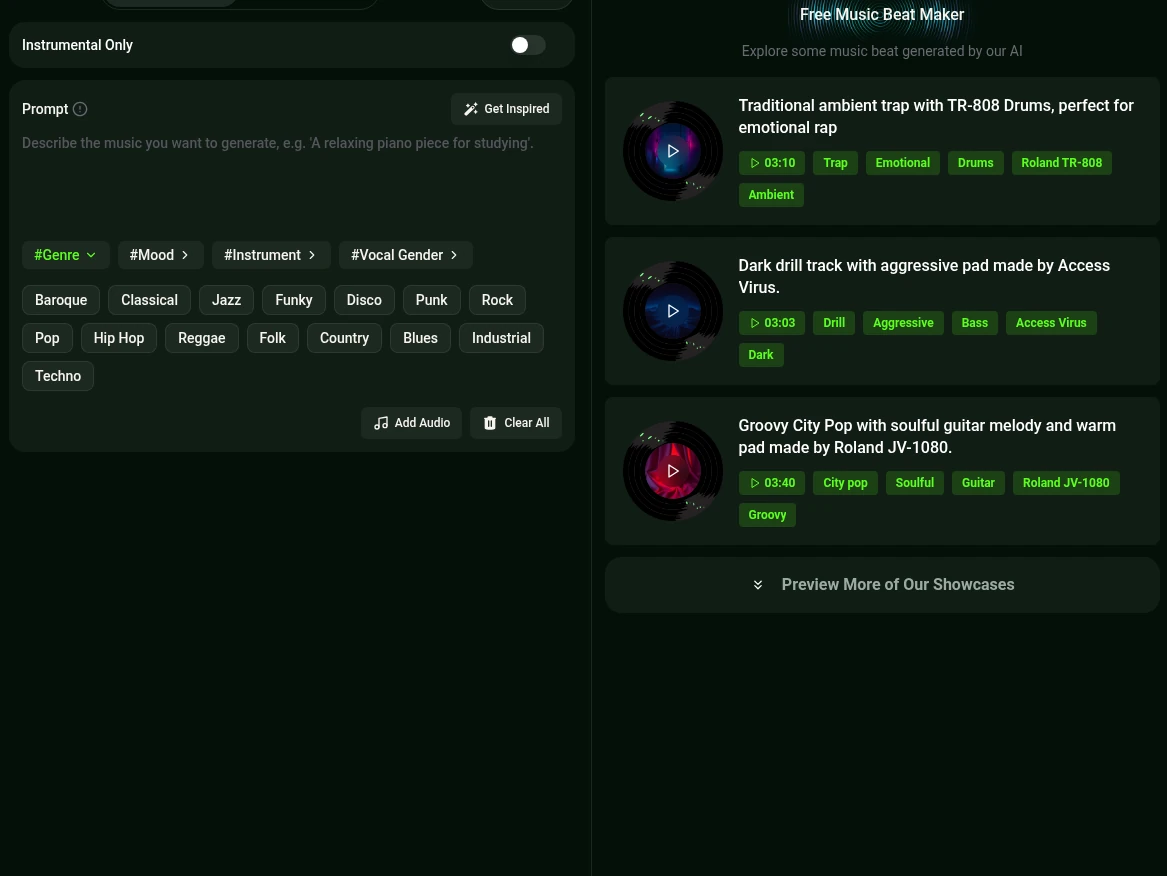
Music Beat Maker Panel in the Best Beat Making Software
Top beat making software holds the controls in one view, and the best beat making software makes them easy to read. The Music Beat Maker panel holds everything for a new beat.
- Prompt and Own Lyrics
- Describe the beat, or add lyrics for a beat with vocals.
- Genre, Mood, Instrument tags
- Tag groups that steer the sound of the beat.
- Instrumental Only
- A switch for a clean instrumental beat.
- Add Audio
- Upload a reference sound to guide the result.
Make a Beat with the Best Beat Making Software
Open the Music Beat Maker
Start in the browser on a phone or a computer.
Web app, any deviceWrite the beat prompt
Name the genre, the drums and the mood, for example dark warehouse techno.
Tap a genre chip
Add Hip Hop, Techno or Funky, and switch on Instrumental Only.
Generate and pick
Play the versions and download the favorite as MP3, WAV or FLAC.
Versions to compare

Best Beat Making Software Tools by Style
The best program to make beats depends on the style. MusicAI has a dedicated tool for each route.
Rap Beat Maker
Hard drums and bass lines for verses and hooks
AI Beat Generator
Any genre from a detailed text prompt
Metronome
A steady click for practice over a new beat
Together these tools make a strong case for the best beat making software in a browser tab.
Frequently Asked Questions
What is the best program to make beats for a beginner?
The best beat making software for a beginner turns an idea into a beat in a single step. On MusicAI a short text prompt and a genre chip return instrumental versions.
Does the beat maker run on a phone?
Yes. MusicAI is a web app, so the beat tools open in a phone browser as well as on a laptop.
Can a beat carry vocals?
Yes. Leave Instrumental Only off for vocals, or switch it on for a clean instrumental beat.
How can the tempo of a reference song be found?
Key BPM Finder reads the key, BPM and energy of an upload, and BPM Tapper finds the tempo by tapping along.
Which file formats does a finished beat download in?
A finished beat saves as MP3, WAV or FLAC, covered by a commercial license.
Try the Best Beat Making Software Online
Describe a beat, pick a genre and hear the versions.